> For the complete documentation index, see [llms.txt](https://enercalc.com/docs/llms.txt). Markdown versions of documentation pages are available by appending `.md` to page URLs; this page is available as [Markdown](https://enercalc.com/docs/sel-user-manual/calculation-modules/column/steel-column.md).
# Steel Column
How to design steel columns for axial load and biaxial bending per AISC 360 in ENERCALC SEL.
{% columns %}
{% column width="33.33333333333333%" valign="middle" %} Verification Example
{% endcolumn %}
{% column width="66.66666666666667%" %} This example includes calculation details, references to design provisions, and step-by-step results for easy checking.
{% endcolumn %}
{% endcolumns %}
This module designs steel columns that are subject to axial loads and lateral bending loads about both axes.

The user can select ASD or LRFD methods and has access to a complete database of steel section sizes.
All calculations are according to AISC 360.
The screen capture below shows the full screen for steel column design. See items below for descriptions of items that are specific to the steel column design module.
For general description of the module, end fixity, loads, and load combinations [click here](/docs/sel-user-manual/calculation-modules/column.md). For slenderness description [click here](/docs/sel-user-manual/calculation-modules/column/all-columns/column-slenderness.md).
## Inputs Window
### General
The area indicated in the screen capture below is specific to the steel column selection. Here you can specify ASD or LRFD design procedure and specify the yield strength and elastic modulus of the steel member to be used.
Click the button to display the Steel Fy Selections dialog to select a standard grade.

### Column Data
All items on this tab are specific to a steel column.
The item circled in **red** is where you can type in the typical section name, press \[Tab], and the section will be searched and retrieved from the built-in database. Or you can click the button, and you can select a section from the built-in AISC database.
The items circled in **blue** are the section properties for the section you have chosen.
The item circled in **green** is the Quick-List". Click on one of the many buttons with a section letter and the full list of those sections will be displayed to the right. Simply click on a section and it will be assigned to the red and blue areas.

The button circled in **pink** will display the Steel Member Design dialog (see below).

This tool checks all of the steel sections for the selected type (W is selected in this case). A section will be judged to pass if the maximum stress ratio entered is not exceeded
and the depth measurements and depth class are not exceeded.
The term "Depth Class" refers to the nominal dimension of the family to which the section belongs (ex: W14). It does not refer to the actual depth of the section. All sections starting with "W14" are of the "14" depth class.
### Loads
**Load Reference Guide:** Clicking this button opens a pop-up window that displays the positive sign conventions used in the module.

For more information on the Loads tab, please refer to the [Columns](/docs/sel-user-manual/calculation-modules/column.md) topic.
## Outputs Window
### Calculations
#### Results
This tab provides a summary of the stress ratios, reactions and deflections for the column.
**Max Axial + Bending Stress Ratio** is the governing load combination for the column. Listed is the governing load load combination, the AISC formulas that are used, and the location of the maximum stress ratio above the base of the column. Please note that the maximum stress ratio is being reported (along with its location) because it governs the overall design, even though it may not necessarily be the highest axial stress or the highest bending stress experienced anywhere in the column.
**Max Shear Stress Ratio** will probably never govern for a normally loaded column design. But it is presented here with the governing load combination, location and allowable/actual stress values.
**Lateral Load Reactions** and **Deflections** are the result of applied **lateral** loads.

#### Design Maximum Combinations
This tab lists the resulting maximum stress ratios for each load combination. This list is created by examining the detailed list (on the next tab) and determining the governing stress ratios for each load combination.

#### Detailed Results - Shears & Moments
This tab lists the detailed results at small increments along the height of the column, for each load combination.
For consistency, all of the column headings are taken directly from AISC.
Note! This list scrolls to the right to display more information.

#### Detailed Results - Service Load Deflections
This tab reports the deflections at incremental locations along the height of the column, for each service load condition (i.e. for individual load cases and for a set of built-in service load combinations), along each axis.

#### Pn-Mnx-Mny Values
This tab provides capacity envelope data.

#### Reactions - Per Load Combination
This tab displays the support reactions calculated for each load combination defined in the Load Combs > Reaction Combinations tab.

Reactions are reported at both the base and top of the column (where applicable), and include the following:
**Axial @ Base (k):** Axial reaction at the base of the column.
* Positive values indicate compression (downward force).
* Negative values indicate tension (uplift).
**Rx @ Base/Top (k):** Horizontal reaction in the X-direction at the base and top.
* Positive values act in the global +X direction (to the right when looking down at the top of the column).
* Negative values act in the global -X direction (to the left when looking down at the top of the column).
**Ry @ Base/Top (k):** Horizontal reaction in the Y-direction at the base and top.
* Positive values act in the global +Y direction (upward on screen when looking down at the top of the column).
* Negative values act in the global -Y direction (downward on screen when looking down at the top of the column).
**Mx @ Base/Top (k-ft):** Moment reaction about the X-axis at the base and top.
* Positive values follow the right-hand rule. Point your right thumb in the direction of the +X-axis (to the right when looking down at the top of the column), and your curled fingers indicate the direction of the moment.
* Negative values follow the right-hand rule. Point your right thumb in the direction of the -X-axis (to the left when looking down at the top of the column), and your curled fingers indicate the direction of the moment.
**My @ Base/Top (k-ft):** Moment reaction about the Y-axis at the base and top.
* Positive values follow the right-hand rule. Point your right thumb in the direction of the +Y-axis (upward on screen when looking down at the top of the column), and your curled fingers indicate the direction of the moment.
* Negative values follow the right-hand rule. Point your right thumb in the direction of the -Y-axis (downward on screen when looking down at the top of the column), and your curled fingers indicate the direction of the moment.
#### Reactions - Extreme Values
This tab summarizes the maximum and minimum reaction forces and moments that occur at the top and bottom of the column across all defined load combinations.
.png?alt=media)
The following values are reported (where applicable):
* **Axial, Base Max** and **Axial, Base Min:** The max and min vertical axial reactions at the base of the column.
* **Rx, Base Max** and **Rx, Base Min:** The max and min horizontal reactions in the X-direction at the base and top.
* **Ry, Base Max** and **Ry, Base Min:** The max and min horizontal reactions in the Y-direction at the base and top.
* **Mx, Base Max** and **Mx, Base Min:** The max and min moment reaction about the X-axis at the base and top.
* **My, Base Max** and **My, Base Min:** The max and min moment reaction about the Y-axis at the base and top.
Notes:
* "Max" values represent the "most positive" results (i.e., closest to positive infinity), while "Min" values represent the "most negative" results (i.e., closest to negative infinity).
* Reaction components with no results are omitted from the table. For example, a cantilever column will not display any Top extreme values, since no reactions exist there.
* Zero values are shown as blank in the table for clarity.
.png?alt=media)
The results are presented in a tree-structured table. Each row shows an extreme value and can be expanded to reveal:
* The load combination(s) that produced that extreme value.
* The associated reaction components for those combinations.
* If multiple load combinations result in the same extreme value, all contributing combinations will be listed.
### 2D Sketch
2D sketch of the steel column
### Diagrams
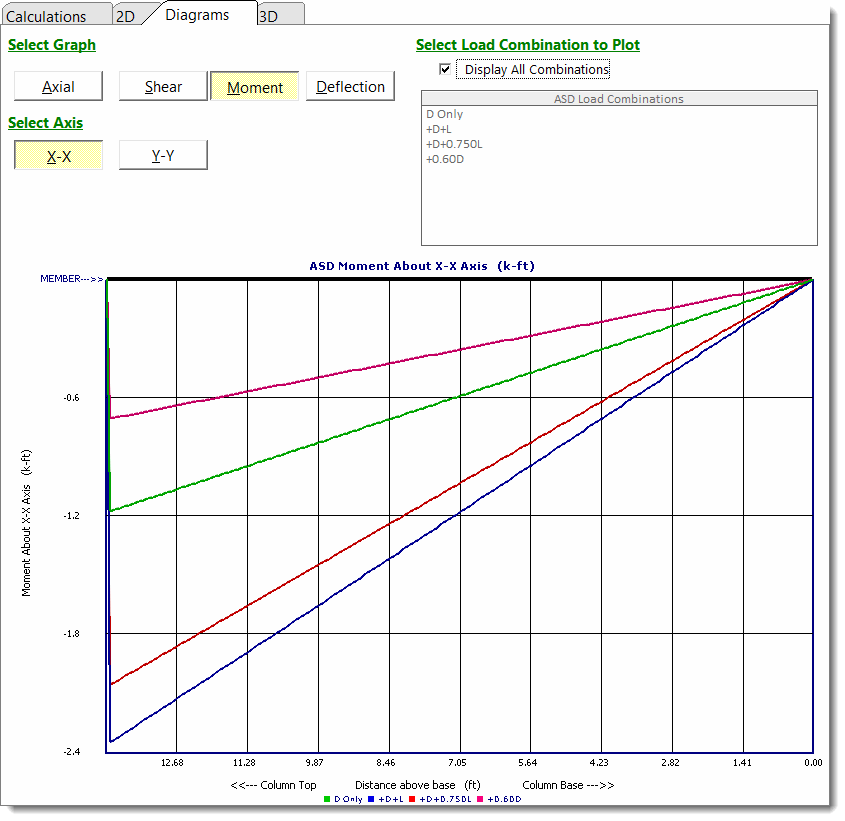
This tab graphs axial load, shear, moment, and deflection along the column. The graph runs from the column top at left to the column base at right. This orientation maximizes the available graph area.
* **Axial:** Positive values indicate compression. Negative values indicate tension.
* **Moment:**
* **About the X-X axis:** Positive values indicate tension at the +Y face. Negative values indicate tension at the -Y face.
* **About the Y-Y axis:** Positive values indicate tension at the +X face. Negative values indicate tension at the -X face.
* **Deflection:**
* **About the X-X axis:** Positive values indicate deflection in the +X direction. Negative values indicate deflection in the -X direction.
* **About the Y-Y axis:** Positive values indicate deflection in the +Y direction. Negative values indicate deflection in the -Y direction.
Diagrams for axial load, shear, moment, and deflection
### 3D Rendering
This tab displays the 3D rendering of the column and offers various display options.
3D rendering of the steel column
---
# Agent Instructions
This documentation is published with GitBook. GitBook is the documentation platform designed so that both humans and AI agents can read, navigate, and reason over technical content effectively. Learn more at gitbook.com.
## Querying This Documentation
If you need additional information that is not directly available in this page, you can query the documentation by asking a question.
Perform an HTTP GET request on the following URL with the `ask` and `goal` query parameters:
```
GET https://enercalc.com/docs/sel-user-manual/calculation-modules/column/steel-column.md?ask=&goal=
```
`ask` is the immediate question: it should be specific, self-contained, and written in natural language.
`goal` is what the user is ultimately trying to achieve, the reason they need the answer. Sharing it helps GitBook give you a better, more relevant answer. A goal is most helpful when it describes the outcome the user wants rather than restating the question. For example, with `ask=how do I create an API token`, a goal like `automate deployments from our CI pipeline` lets GitBook tailor the answer to that use case.
The response will contain a direct answer to the question and relevant excerpts and sources from the documentation.
Use this mechanism when the answer is not explicitly present in the current page, you need clarification or additional context, or you want to retrieve related documentation sections.